Take Control of your Money Before It Controll You

Cornie Herring is an finance author of personal finance, debt management & bankruptcy alternatives. You can find useful information and resources to reduce and eliminate your debt issues at her website.


Certainly, you should try to save and invest as much of your monthly income as you can at all the times, but realistically your priorities change depending on which financial phase of your life your are in. "


How to Effectively Take Control of your Money


Do you often find yourself running out of money even before payday? Do you wonder why you can't afford to buy a new car or take the vacation you w*ant when other people who make as much money as you do can? If you have these feeling, you are not alone. This is the common feeling for many people, money always run short. Most of the time, the problem may not be cause by the level of income, but what most of us doing with our income that drag us to the shortage of money. Take control of your money is the solution to make your money do more for you. The question is how to effectively take control of your money?


In fact, you do not need to have a complex formula in taking control of you money, a simple formula such as be aware of how and where you spend it, and invest it is the most effective way to create a wealthy financially lifestyle for yourself. In order to implement this simple formula in taking control of your money, you need to generate an effective plan for your money that can encourages you to develop a set of priorities that helps you to achieve your financial goals.


"What are my financial goals?" You can always start your financial goals setting process by asking this first question. Always start with your short-term goals. Set up a four-column list on a piece of paper, list down all your wishes of things like new cars and vacations which should also including upcoming financial obligations such as taxes and insurance premiums.


In the first column, write down your financial goals, and put the estimation cost into the second columns. Every goal should have a date of realization; place these dates into the third column. From the estimate cost stated at second column and the date of realization, calculate how much money you will need to start saving each month so that you have enough money to realize your goal, write the monthly savings amount into the forth column.


The ideal case is your income is enough to cover the total monthly savings for all your financial goals, but in reality it may not be true. What if you find that you can't save enough money each month to meet all of your short-term financial goals?


Then, you have to one of two things:


1) Reduce your price expectations. For example, spend less on your vacation coming up in 6 months. Or change your vacation location from oversea to domestic.


2) Increase the amount of time before you achieve your goal. For example, delay the purchase of your new car for another six months.


Basically, your financial goals should be flexible enough to inline with your financial affordability and the goals should be reachable.


Once your have set your short-term goals, do the same for your long-term financial goals. In setting your long term financial goals, you also need to figure out how much money to be set aside for emergencies uses. The costs of retirement or college education for your children that won't occur for a number of years are both certainly moving targets. Your long-term goals should be reviewed from time to time to ensure you are on track and if not, what are the adjustments should be made.


Certainly, you should try to save and invest as much of your monthly income as you can at all the times, but realistically your priorities change depending on which financial phase of your life your are in. Invest your money wisely to generate profit out from your money, not the opposite. Most investments have certain risks which you should consider before you put your money in, generally high gain high risk, follow your own risk profile and select the investment portfolio that suit your own risk profile.


Summary


You need to take control of your money so that your money can do more for you; give your money more purposes by documenting your financial goals that involve how's your money is going to help you to realize your financial goals.


Technorati :

Del.icio.us :

Collection of Top SEM Tools online

Aaron Wall.Author of leading SEO blog , offering marketing tips and coverage of the search space, free SEO videos, and free SEO tools.

The number of internet marketing tools(SEM) launched over the past couple years has been staggering. Many of them are both free and highly valuable. SEO, which was once considered a bit of a seedy niche, has grown with search to become a mainstream marketing practice."

Top Top Search Engine Marketing (SEM) Tools

The mainstream marketing practice:

  1. Google providing Webmaster Central, a blog for webmasters, & many of the best free SEO tools
  2. Yahoo! offering a paid inclusion service & a webmaster focused tool by the name of Site Explorer
  3. Microsoft offering SEO services

This article aims to highlight the best search engine marketing tools.

globex.jpg

Keyword Research

Keywords are at the core of search, so any effective SEO campaign starts with keyword research. My 4 favorite keyword research tools are

  1. Google AdWords Keyword Tool
  2. SEO Book Keyword Tool
  3. Google Traffic Estimator
  4. Microsoft Ad Intelligence

Google AdWords Keyword Tool

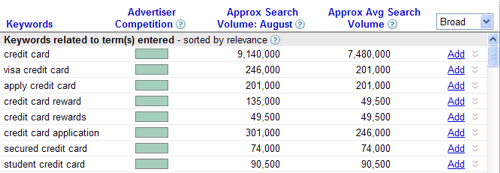
Given Google's enormous search marketshare they have the most keyword data, though typically they have been less open than others with sharing data. Recently the Google AdWords Keyword Tool has started to show estimated search volumes using numbers (rather than graphs).

Cool features:
  • Match Types: Shows search estimates for exact match keywords (the exact keyword), phrase match (searches containing that keyword as part of the search), and broad match (additionally related searches that may have words in a different order).
  • URL Related Keywords: Allows you to enter in a specific page and/or site and find relevant keywords based on that page/site.

SEO Book Keyword Tool

I partnered with the fine folks at Wordtracker to create a free keyword tool powered by their API. The SEO Book keyword tool acts like a meta search keyword tool, where the results are powered by Wordtracker and link to other related keyword tools.

Cool features:
  • Cross referencing: Like search engines, all keyword tools have some biases to them, so the quick ability to compare results from different sources makes this the first keyword tool I typically use.
  • CSV Export: This tool offers a quick CSV export option, which makes it easy to create a keyword list that can be inserted into other tools for further analysis (which I will mention in the Google Traffic Estimator & Microsoft Ad Intelligence sections).

Google Traffic Estimator

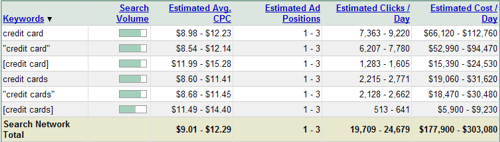
Google Tra*ffic Estimator is a tool which estimates the number of ad clicks that a particular keyword would get at a particular bid price. Given how ad clickthrough rate can vary greatly based on ad copy the estimates can be a bit rough, but this tool does give relative volumes AND values for keywords.

The addition of click cost estimates makes this a nice tool to submit a keyword list to in order to find out which keywords are the most valuable.

Cool features:
  • Bid Price Estimation: If you do not enter in a bid price, they return a bid price that should return your ads in the top position 85% of the time.
  • Match Types: Shows search estimates for [exact match] , "phrase match", and broad match. In this context it is easy to see how long the tail is for a keyword.

Microsoft Ad Intelligence

Microsoft Ad Intelligence is an Excel Plug In for Excel 2003 and Excel 2007.

It is similar to a combination of the Google AdWords Keyword Tool and the Google Traffic Estimator, with a couple additional features included.

Cool features:
  • Real data: One of the ways Microsoft is playing catch up in search is providing their actual search data via this tool (these search counts are the same data set that they use internally). Most search services offer somewhat doctored up estimates.
  • Near realtime: This tool offers many advanced filters, which allow you to sort data as recently as yesterday.
  • Category based keywords: You can find the all time top category based keywords, or category based keywords that have recently become popular... a service that is great for niche publishers.

Search Analytics Tools

If you are not using web analytics you are flying blind. Analytics data gives you the power to refine your strategy based on what is working and what is not. 3 of my favorite analytics tools are:

  1. Google Analytics
  2. Clicky
  3. Mint

Google Analytics

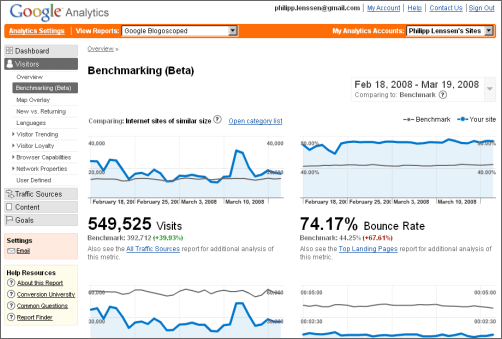
Google Analytics is a robust free analytics tool. The only concern I haveGoogle Trends for Websites with using it is that if you are profiting from a market inefficiency you might be revealing that inefficiency to the largest online ad network... which may then reveal it to other people. With their large search marketshare, their free keyword tools, industry benchmarking data, and the launch of Google Ad Planner (still in beta), Google Trends for Websites, and Google Insights for Search, Google is the leading source of keyword and market data for many online businesses.

Clicky

Clicky is an inexpensive web based analytics tool. In addition to being fairly feature rich, they also offer a white label service that allows webmasters to resell their analytics product.

Mint

Mint is an analytics program you can install on your server for a one time $30 licensing fee. It offers realtime data and has a wide array of extensions that display information in convenient panes, but is not as feature rich as the above options.

More Analytics Tools

There are a wide array of analytics tools on the market. There are niche tools specifically for PPC campaigns like Optimize My Site and Tracking 202, as well as higher end offerings from companies like Omniture... finding the right tool for your needs is largely a function of defining your needs and budget, and if your budget is quite extensive it might make sense to program something in house.

Search Engine Rank Checkers

While most successful SEO professionals pay more attention to traffic trends, conversions, and profits - it is still helpful to track where some sites rank for certain keywords. Tracking how sites move in the rankings for specific keywords gives you clues as to when search engineers change the weightings on things like domain authority, anchor text, and related words.

While Google Webmaster Central shows you some keywords you rank for, they do not show you the keywords you rank on page 5 or 6 for... just the keywords where you show up near the top of the search results often. Years ago Google had a useful search API, but more recently they have been using an Ajax API which does not work well with rank checkers.

My 2 favorite rank checkers are

  1. SEO Book Rank Checker
  2. Advanced Web Ranking

SEO Book Rank Checker

This free rank checking tool is a Firefox extension which allows you to track how you rank in the search engines for a variety of keywords.

Cool features

  • International: It works with international versions of Google.
  • Automated: Allows you to create preset lists which automatically run at a set periodicity .
  • Exportable: Allows you to export the results and see how rankings for a keyword have changed over time.

Advanced Web Ranking

Starting at $99, Advanced Web Ranking is one of the more popular desktop search engine rank checking tools.

Cool features
  • Graphs: Allows you to view graphs of how your rankings change over time.
  • Wide Selection of Search Engines: If you live in China, Russia, or another market where Google is not the clear market leader, then this tool will still work for you, as they allow you to track rankings in hundreds of search engines.

Link Analysis Tools

Link analysis is a field which has lost a bit of its importance over the past couple years. Google has clamped down on paid links, web directories, and article directories. At the same time more people are blogging online, and more webmasters have become aware to the field of public relations and the value of links. These combine to make it is much harder to catch up with a competitor if you are trying to duplicate their link building strategy.

To some degree link analysis has moved away from PageRank and anchor text toward analyzing news in the marketplace and understanding why stories are spreading (link analysis is evolving into media analysis and public relations). Here are 6 of my favorite link analysis tools

  1. Yahoo! Site Explorer
  2. Google Blog Search
  3. Google Webmaster Central
  4. SEO Link Analysis
  5. Xenu Link Sleuth
  6. Advanced Link Manager

Yahoo! Site Explorer

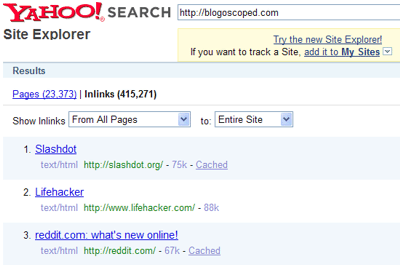
Google and Microsoft generally show rather limited link data to the public. Yahoo! Site Explorer shows a much deeper and more representative sampling of inbound link data.

SEO Link Analysis

SEO Link Analysis is a free Firefox extension that adds link anchor text, PageRank score, and if a link is nofollowed to Yahoo! Site Explorer results.

Google Blogsearch

While Google tends to show a small sample of backlinks their Blogsearch is much better at detecting new links from blogs.

Google Webmaster Central

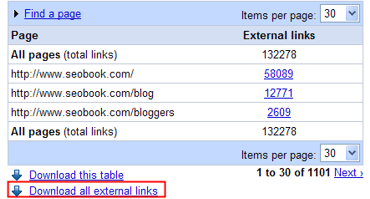
If you verify you own a website inside Google Webmaster Central, they will allow you to download a list of links pointing at your site. If you notice your rankings for a keyword are decent (but could be better) you could look through some of the people linking at your page and ask them to link at your page using more specific anchor text.

Xenu Link Sleuth

Xenu Link Sleuth crawls websites looking for broken links. This helps you keep your website maximally clean and functional by finding any broken internal links and any references to documents that are no longer online.

Advanced Link Manager

Advanced Link Manager is a paid software package starting at $199 which allows you to automatically track new backlinks obtained by competitors. It also crawls pages to find anchor text, if the link is using nofollow, and the PageRank score of the linking page.

We also created a free tool somewhat similar to Advanced Link Manager, named Backlink Analyzer. We have not updated our tool in a while though, and it is sorely in need of an update.

PPC Tools

As search ad networks have become less transparent many PPC tools that did things like bid gap management have been rendered useless, while Google has built out a powerful AdWords API, an ad platform that allows you to bid per click or per conversion, and the Google AdWords Editor.

  1. Google AdWords Editor
  2. Google Website Optimizer
  3. Speed PPC
  4. PPC Tools suite
  5. PPC Analytics Tools

Google AdWords Editor

Google AdWords Editor is a free desktop tool advertisers can use to quickly edit their AdWords campaigns in bulk.

Google Website Optimizer

Google Website Optimizer is a free tool that makes it easy to test and improve your landing page and conversion process. Conversion Rate Experts offers a great overview article about how to take advantage of Website Optimizer and other conversion boosting tools.

Speed PPC

Speed PPC is a paid desktop software program which makes it easy to generate many cross referenced ad campaigns and landing pages for geo-targeted keyword combinations. At $497 Speed PPC is not cheahow to take advantage of Website Optimizer and other conversion boosting toolsp, but if it is beyond your means and you are a good programmer then Zipcode Guy offers a free database of U.S. cities and zip codes.

PPC Tool suite

My wife has build a free collection of useful web based PPC tools including a keyword list generator, a keyword list cleaner, a typo generator, a keyword wrapper, an ad group generator, and a ROI calculator.

  • The keyword list generator can be good for creating a quick list of keywords to plug into a PPC account to see what variations get the most search volume, then trim back the fat after you collect some account feedback data.
  • The keyword list cleaner is good for taking a dirty keyword list and making it useful. For example, lets say you have a list of MP3 player related keywords. This tool allows you to quickly filter out any keywords related to car and automotive MP3 players.
  • The ad group generator makes it easy to create ad groups for Google AdWords, Yahoo! Search Marketing, and Microsoft adCenter at the same time.

PPC Analytics Tools

  • Many big affiliate marketers create their own bid management software, but newer affiliates may find tracking tools like Optimize My Site and Tracking 202 useful.
  • Many enterprise level websites create custom bid management software for their company, but for enterprise level merchants who do not manage paid search in house, firms like Efficient Frontier can help with management.

Competitive Research

Services like comScore and Hitwise have been around for many years for the people who could afford to buy their data, but their price points are north of what most people are willing to pay. Competitive research is one of the areas which has improved the most in the past few years, largely by a number of companies making products and tools at a more accessible price point. Here are 5 of my favorite competitive analysis tools.

  1. Compete.com Search Analytics
  2. Google Website Trends & Google Insights for Search
  3. Microsoft Ad Intelligence
  4. KeyCompete
  5. SEO Digger

Compete.com Search Analytics

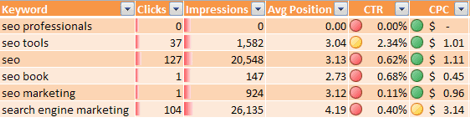
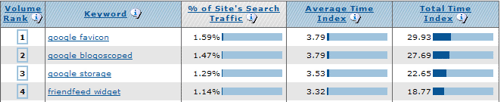
Much of the consumer facing innovation in the competitive analysis industry stemmed from Compete.com launching with free basic analytics data, and using a credit based system that allowed anyone to buy competitive data for as little as $20. Since then they have changed their pricing model to one based on a flat monthly fee starting at $299 a month. Here are some of their top keywords for blogoscoped.com... and they offer the option to download hundreds more

Cool features

  • Category based top keywords: they were one of the first services to offer top keywords by category (this feature has since been cloned by Microsoft Ad Intelligence and Google Insights for Search).
  • Weighting based analytics: they not only show popular keywords sending traffic to competing sites, but they show the approximate percent of traffic driven by each keyword.
  • Organic vs paid breakout: they break out which traffic came from organic search vs paid search ads.

Google Website Trends & Google Insights for Search

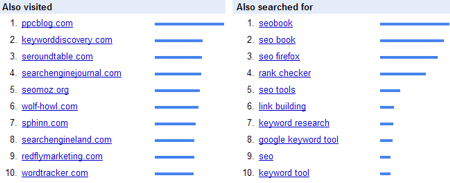
Google Trends for Websites displays related sites, related search queries, and what countries a website is popular in. Google Insights for Search shows category related keywords, top search terms related to the keyword you entered, and top rising related keywords.

Microsoft Ad Intelligence

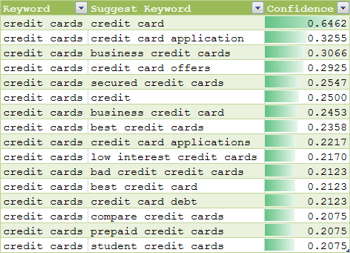
Microsoft Ad Intelligence, also covered in the above keyword tools section, offers top category based keywords and allows you to research keywords based on campaign association with competing advertisers (along with confidence estimates).

KeyCompete

KeyCompete is a paid tool that lets you find what keywords competing advertisers are buying. This tool is especially powerful for affiliate marketers, where many of them resell the same product or service and need to get a baseline idea of what competitors are doing. SpyFu offers a similar service.

SEO Digger

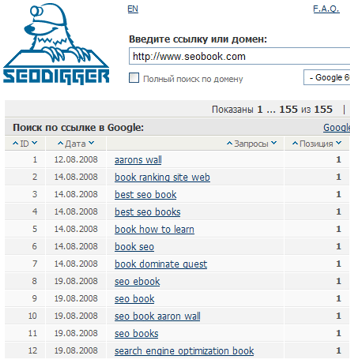
SEO Digger is similar to KeyCompete, but is free and works on showing what organic keywords a website is ranking for. URLTrends, which is currently undergoing redesign, is similar to SEO Digger.

By:Aaron Wall

[Source of first image Creative Commons-licensed by Brian Caldwell.]

Technorati :
Del.icio.us :
Zooomr :
Flickr :

Your Website from the Ground Up in 10 Steps

By Scott Van Achte.A Senior SEO at StepForth Web Marketing Inc.; based in Victoria, BC, Canada .Visit news.stepforth.com or contact them at StepForth.com, Tel - 250-385-1190, TollFree - 877-385-5526, Fax - 250-385-1198


Make sure that the content you write reflects your industry and target keywords. You don't need to flood the content with your target keywords, but make sure they are in there a few times. When it makes sense to do so, also include some acronyms to help Google establish the overall relevance."


Your Website from the Ground Up in 10 Steps

chp_harrier.jpg

So, you have finally decided to build yourself a website, but really have no idea where to start. The following 10 steps will give you some insight into what you need to address when creating a search friendly website from the ground up.

While this article is not an exhaustive líst of everything you need to know, it does touch base on many of the important aspects of creating a new website.


Step 1 - Keyword Research


Even before you choose your domain name, you should put a little time into some keyword research. Research all the possible keywords that will fit your industry and the website you plan on building. Having a clear idea of what your end targets are will make the rest of your job much easier and help things to just fall into place. Take a look at Keyword Research for SEO, written earlier this summer, for more help on this. Your Vote Counts!


You can try Wordtracker . a keyword research tool.or Vvsit Digital earning resources blog for more keyword tools.


Step 2 - Domain Selection

If you already have an established brick and mortar business and the website will be an extension of that business, using your company name as the domain name is in most cases the best idea. If your company name is either irrelevant, or simply unavailable, you may want to consider a domain that has your target phrase listed as part of the domain.


A great example of this is if your site is focused geographically. Using the location as part of the domain when possible will give you a little extra juice with the search engines and help draw people to your site as they instantly can see the relevance in the domain.


Let's say that you are building a website focused on your home town, "Somewhere USA". A domain you may consider could be "Somewhere.com"; however, this would probably be already taken. Other options such as "SomewhereInfo.com" or "SomewhereGuide.com" may be good alternatives. The same goes for retail stores. "SomewhereCameras".com or "SomewhereBakery".com would also be good choices.


Avoid excessive use of hyphens; sometimes it is appropriate to use one, but if you can help it, avoid more than that as it can appear messy and even spammy in some cases.


Step 3 - System Back End

If you plan on having a large scale website that will grow and change constantly then you may want to consider a content management system (CMS) such as Joomla. If you decide to go this route, you want to ensure that whichever CMS you choose is search engine friendly and offers items such as unique title tags, custom URL's, and full control over content, heading tags, image alt tags, etc.


Starting a website using a non-friendly CMS is like buying a car without an engine. Sure it may look great, but it won't get you anywhere.


Step 4 - Site Structure & Navigation


This is really one of the most fundamental aspects of your site creation. If the structure of your site does not work well, then your site may be doomed from the very beginning.


Take a look back at your keyword research and brainstorm all the areas of your site that you may want to develop content for. In some cases you may find valuable keywords that would fit perfectly into a few pages of content for your site. If the phrase and the content would be a good match for the theme of your site, go ahead and note them as pages to create. Get a líst, or flowchart, of all the content you plan on adding and sort those pages into relevant categories.


Forget Expensive PPC Advertising - There is an Alternative!


Be sure your site files are saved in a way that makes sense - this includes both the file name, and the complete path to the file. Save files, including similar content in a relevant subdirectory, with simple file names representing each. Let's take an example of an informational site dedicated to a specific geographic location. If you have a series of pages dedicated to recreation, you may save them as:


/recreation/parks.html


/recreation/trails.html


/recreation/beaches.html


Keeping your URL structure clean and tidy can not only help with search engine rankings, but it will give a good visual impression to the site visitor as well. Often, using each of these categories as main points for your primary site navigation may make the most sense.


Also be sure to keep your site relatively flat, with as few layers as possible. Don't make the search engines follow a dozen links to get to the deepest levels of your site. Unless the site is literally tens of thousands of pages, there is no need to click more than 2 or 3 links to get to any deep content. The shorter the path to an internal page, the more credít by the search engines.


Step 5 - Navigation


When developing the end site, you also want to make sure that your site navigation is search engine friendly - this is critical if you ever want free organic listings.


If possible, use a text based form of navigation. You can use CSS to style the text links to fit into your graphical design. Text links are the best method, but image based navigation and even some forms of drop down menus are also search engine friendly.


If you choose to use image based navigation be sure to include image alt text relevant to the link to give something for Google to associate with the linked page. If you absolutely must use Flash, or any form of navigation not friendly for search engine spiders, be sure to supplement this with text based links on another location of the page.


Step 6 - Analytics


It isn't ever too early to start thinking about your stats. Before your site goes live you must have some form of accurate analytics in place so you can measure your site's traffic and progress.


There is an endless supply of analytics options out there to choose from. You can simply use the stats software that comes free with your web hosting, however, more often than not, they tend to be very basic with no flexibility. Advanced choices such as ClickTracks can give you rather in-depth statistics, but for a very small mom and pop operation it may be too expensive. Google Analytics, is a free option that can give you most, if not all the data you will need and does not require access to your raw log files.


If you do opt for an option such as ClickTracks, check with your host to ensure that you will have the raw log files you require. StepForth can also help you with your statistical analysis and offers a number of inexpensive ClickTracks service packages.


Step 7 - Content Creation


Now is the time to get that new, fresh content posted to your site with the SEO in mind. Make sure that the content you write reflects your industry and target keywords. You don't need to flood the content with your target keywords, but make sure they are in there a few times. When it makes sense to do so, also include some acronyms to help Google establish the overall relevance.


If you perform a search in Google for "~keyword", any words that Google bolds in the search results will be acronyms that Google deems relevant. Include some of these where possible.


Step 8 - Basic SEO


Ensure that ALL pages of your site include Title and Meta Description tags. This is one of the core fundamental aspects of an optimized size and it does play a significant role in your search rankings. Make sure that these tags are not only unique but are accurate representations of each page. Also be sure to place your target phrase in heading as well as image alt tags where applicable.


check out my previous post :Using Internal Linking To Get Better Search Engine Exposure


Step 9 - Initial Promotion / Launch


Now that you have your new site all up and ready to go, let's drive some traffi*c. It will be a while before the search engines fully index your site and even longer before you start to see organic rankings for your target search phrases. It is important to start off right away to get the ball rolling.


Start off by issuing a press release to announce the launch of your new business website. Press releases are a great way to get some tra*ffic and a rather valuable first link into your site. Submitting your press release using a company such as PRWeb will get your link in the engine's path and should help your site to be initially indexed by Google right away.


Next submít your site to some relevant directories starting with DMOZ. It can take months, even years, to have your site listed in DMOZ, so it is important to get it submitted right away. Consider submittíng to other industry relevant directories. For some information on how to select the right directories take a look at Building Links with Directory Submissions.


Work on getting as many links from relevant industry websites as possible. The more links you can get from reputable sources, the better the overall performance of your site.


Step 10 - Ongoing Promotion

Once you have completed the site, the content looks great, and all appears finished, you've still got work to do. For long term success, especially for a brand new site, you need to continually promote your site. You should always be looking at ways to build your inbound links and your relevant content.


Consider creating accounts with various social media platforms to help promote your site. These can not only give you a link back to your site, but they can help you drive traffic and raise awareness about your business and product.


A site that is always growing, and always getting new links, has the best chance of getting a stable top 10 listing in Google.

Using Internal Linking To Get Better Search Engine Exposure


By Randy Zlobec (c) 2008
RZ Concepts a search engine marketing company specializing in website promotíon and internet marketing.

Your internal linking structure will not only benefit your visitors, but it will help you rank better with the search engines as well.

Using Internal Linking To Get Better Search Engine Exposure

Anyone who runs a website should be aware of a few basic search engine linking tactics. Used properly you can interlink your website so that Google, Yahoo and the other major search engines will rate you higher in both page rank and search engine results for your keyword/key phrase niche terms. If you're unaware of what internal linking means, here's a basic overview.

engine_love.gif

Internal linking involves the links on your website that point to other pages on your website. Internal linking is very important because it allows the search engine spiders, those automated bots that scour the Internet looking for information, to find all of the pages on your website. In comparison, external linking are links that are on your website which link out to other websites, and there are specific tactics for those as well. In this article, however, we're going to cover a few simple tactics and strategies to get your internal linking up to speed.


You Can Have the Number One Position on Google!

When you're developing your website, you will tend to put a whole lot of pages of similar information tailored to a specific niche or subject that you going to convey to your visitors. You probably will have information, news, how-to articles, tips and sales pages, where informed visitors can buy your products or services. Your internal linking structure will not only benefit your visitors, but it will help you rank better with the search engines as well.

Having a good navigation system makes Google and Yahoo happy, and in turn, they will reward you because you are doing things to improve the visitors' website experience. So, for example, if you have an internal linking structure that is seamless, intuitive and allows your visitors to quickly find what they're looking for, search engines will give you more page rank, index more of your web pages and return higher search results for user queries.

Why? You have taken the time to help your website visitors have an excellent customer experience. As a result, your tactics and strategies should be geared towards giving arriving visitors not only the information that they seek, but have it presented in a way that they, and search engine bots, will love.

So how do you accomplish this? There are a few basic tactics, you can use that will improve your internal linking structure right off the bat.

Number 1 - use the rel="nofollow" HTML tag for pages that you don't wish to pass rank to Google. For example, let's say you had a three-page site. Now, we all know that most people have more than three pages for an entire website; however, this will make it easier to follow.

The first page is your home page which gets 100% of the search engine ranking and love. The second page is an information or information/sales page, with the third being a checkout page.

If you don't use the nofollow tag on one of the pages, both pages will be passed half of 50% each for the link from the home page. So, they'll each get 25% of the ranking and love passed through from the spiders.

The search engine spiders will naturally give your home page the best page rank and index it first. Say, you plan to link to the information/sales page and make sure that a lot of people find it, because the information page is what will sell your product or service.

For ranking and indexing purposes, you consider the checkout page as useless, so you don't care if the search engines find it or not. In fact, you'd prefer it if they didn't index it all. What do you do?

Forget Expensive PPC Advertising - There is an Alternative!

When you link from your home page, you can do one of two things.

  • Link to the information page only from the home page.
  • Link to both pages but use the no follow tag to the checkout page. In that way, if someone arrives who is already sold on your product, they can go directly to your checkout page and buy the product.

Two things happen with scenario #2. You give the customer/visitor the option. Because, the search engine is applying SEO love to one page and not two, the page rank passed will not be 25% and 25% for each page, but 0% for the checkout page and 50% for the information page which needs it. You maintain the search engine indexing and page rank for those pages that are important.

This is just one thing that needs to be considered when setting up your website. Professional SEO firms use this algorithm in order to get specific pages on your website to rank higher and return results in the search engine results pages that are much higher than other pages like your checkout pages which you don't care about.

Number 2 - Add extra links in your navigation area or footer area that link to important pages and main sections on your website.

This extremely easy tactic is often overlooked by many websites, but it does return very good results for deep linking, and most SEO firms will review your footer links when they take you on as a candidate in order to utilize that other form of deep linking.

The reason for this is that so many people forget to do it, and many Web designers add really cool buttons, images and all kinds of funky image stuff that do nothing to improve your page rank or your results in a search engines.

You should remember that search engines can't follow image links or links created in JavaScript. So, you want to add simple text links that the robots can follow to index your website more fully.

These are only two of the tactics that are covered when you hire a professional, savvy SEO firm to optimize your web layout and linking structure.

10 Secrets to Using Twitter to Attra More Followers and Get More Clients

By Donna Gunter (c) 2008
Online Business Manager and Online Business Coach Donna Gunter helps independent service professionals learn how to automate their businesses, leverage their expertise on the Internet, and get more clients online. To claim your FREE gift, TurboCharge Your Online Marketíng Toolkit, visit her site at OnlineBizU.com . Follow Donna on Twitter: http://twitter.com/donnagunter

Twitter can be a great time-waster or a wonderful way to market your business and leverage your expertise online. Follow these 10 strategies and you'll begin to attract more followers and get more clients through social networking.

10 Secrets to Using Twitter to Attra More Followers and Get More Clients

I do wonder at times if some Twitter users have any time to get any work done. Several of the more prolific ones that I follow swear they spend no more than 30 minutes a day on Twitter, but I really find that hard to believe. Many times it seems they are twittering just to say something, like "Good morning Twitterverse" when they begin their day, give more details than I want to know about what they had for lunch, what their children said to them, or when they take a nap.

twitter.png

I realize that this is part of the "like, know, and trust" process that enables people to get to know each other, but sometimes it's simply too much information..LOL. I'm Twittering primarily to market my business. Consequently, I try and limit my personal twitters to no more than 2 per day. My clients, who create Twitter accounts for marketing, as well, tell me, "I'm signed up. Now what in the world do I Twitter about? How do I market my business with this tool?"

Here are 10 strategies that I use regularly to market my business and my expertise via Twitter. Remember, you have only 140 characters for your tweet (Twitter post).


1. How you're helping clients . Talk about specific ways that your business helps clients and use their Twitter ID if you have their permission, i.e. "Just finished @clientname brainstorm great Internet marketing plan for 2009" or "Finally finished setting up Quickbooks for local hardware store -- now they can invoice their clients"

2. What you're doing in your business. This is a perfect time to tell others when you're blogging, writing an article, creating your weekly ezine, recording your podcast, i.e. "Had great interview with Jane Smith today on speaking to grow your biz. Great ideas! Subscribe to podcast & listen here (URL here)'


3. Useful tool or resource you've found. I run across these all the time in my daily activities, and Twitter is a perfect place to share,. i.e. "Found great new Firefox plug-in to monitor & check multiple Gmail accounts at same time at (URL here)" or "Read great blog post on workíng at home with kids under 5 at (URL here)"

4. Ask a question. Need some ideas or some quick brainstorming? Twitter is an ideal place to gather opinions, i.e. "Help! Desperately seeking new laser prínter. Recommendations?" or "How do I find training organizations online?"

5. Conduct a survey. What do your Tweeps think about a particular issue? Ask them via Twitter, i.e. "Quick poll: Do you get more clients from Facebook or Twitter? Respond at (URL here)"

6. Report on live events. The latest Twitter trend seems to be tweeting what's happening at conferences or workshops. In order for Twitter users to follow a particular event, it's usually referred to by a name preceded by a # sign, as in #JVAlert, for example, to make it simpler for people who want to follow those posts. So, if you were at an event, you might tweet "#JVAlert John Smith speaking on affiliate programs. Just got great idea on training affiliate managers!" Just don't get so wrapped up in tweeting that you ignore the content delivered in the conference!

7. Product or service launch. If you're about to launch a new product or introduce a new product, let your Twitter followers know, i.e. "Pre-launch pricing for new DVD set about how baby boomers can start an online biz. Get $100 early bird discount at (URL here)"

8. Responding to others with advice or answers. The way to build professional relationships on Twitter is to help your tweeps. So, if someone asks a question, comments about something to which you have a response or an idea, or you want to ask a followup question, this is the perfect place to do so.

9. Acknowledging new followers. I've noticed a recent trend of acknowledging people who've decided to follow a Twitter user in the past day or so. I initially thought that others were doing this as a measure of popularity, but what I've come to realize is that it's actually helping out the new followers because it exposes their Twitter profiles to others who may have never heard of them and who might like to follow them. So, to thank your followers, you'd tweet, "Welcome new followers @twittername, @twittername, etc."

10. Automate your tweets. Many of my tweets have been automated and connected to other things I do. TwitterFeed turns all of my blog posts into tweets. aWeber turns each ezine issue into a tweet. EzineArticles.com tweets my followers every time I publish an article through their service. Typically all that's involved here is connecting the particular service to my Twitter account. Once all the services are connected, I get free and automated Twitter posts with no additional effort on my part.

Twitter can be a great time-waster or a wonderful way to market your business and leverage your expertise online. Follow these 10 strategies and you'll begin to attract more followers and get more clients through social networking.